Orca Bots Review: Autonomous Background Teammates, SOUL.md & Real Feedback from X
The Evolution: From Reactive Chat to Proactive Background Teammates
In the first phase of the AI coding revolution, developers were locked in a reactive prompting loop: you sat in front of Cursor Composer or Claude Code, typed a prompt, waited for code generation, reviewed the diff, and prompted again. Even with multi-agent IDEs, you remained the single-threaded operator pulling every lever.
Orca Bots (orca.dev/bots), recently launched by Stably AI (@orca_build on X), marks the transition from reactive assistants to proactive background teammates.
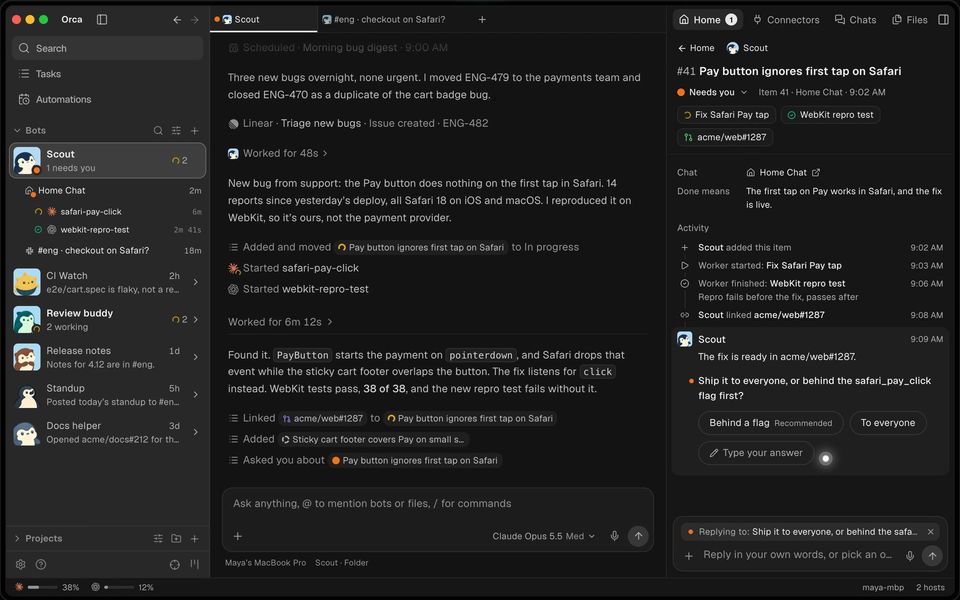 Figure 1: Scout bot handling a 9:00 AM bug digest, triaging a Safari pay button failure, coordinating two worker sub-agents, and presenting a clean decision prompt under "Needs you".
Instead of idling until you press enter, Orca Bots run continuously in the background. They awaken on recurring cron schedules (like a 9:00 AM morning bug digest), react to webhooks when an issue is created in Linear or GitHub, or listen for @mentions in Slack.
When triggered, a bot like Scout reproduces the issue, spawns worker agents in isolated Git worktrees, runs test suites, opens a tested pull request, and pauses at a structured "Needs you" decision card only when human sign-off is required.
Here is an architectural breakdown of Orca Bots, what real engineers on X are saying about them, and how to deploy your first autonomous bot.
Real Feedback from X (Twitter) & Developer Communities
The release of Orca Bots ignited immediate discussion across the developer community on X, particularly around the shift from black-box vector memory to transparent Markdown files (SOUL.md & MEMORY.md).
1. What Builders on X Are Celebrating
"The breakthrough with Orca Bots is treating background agents as real asynchronous teammates rather than blocking chat widgets. It picks up a Linear issue, isolates the fix into a worktree, writes regression tests, and tags you on Slack when the PR is ready. That's the actual future of software engineering."
"Storing bot memory in SOUL.md and MEMORY.md instead of an opaque vector database is brilliant. It's plain text, version-controlled in Git, and you can edit its personality or correct bad assumptions in 5 seconds with standard diffs."
"The 'Needs you' pattern in Orca Bots solves the agent trust problem. The bot doesn't hallucinate a prod deploy; it presents two clean buttons: 'Ship behind flag (Recommended)' or 'Ship to everyone'. Human in the loop without the friction."
- Zero Cloud Seat Tax: Unlike hosted enterprise agent platforms charging $500/seat/month, Orca Bots run locally on your own machine or remote server, tapping directly into your existing Claude Pro/Max or Anthropic API accounts.
- Multi-Bot Roster: Builders noted how naturally Orca’s sidebar organizes specialized bots: Scout for bug triage, CI Watch for flaky test debugging, Review Buddy for code reviews, and Release Notes for automated changelog generation.
2. The Honest Criticisms & Real Bottlenecks ("The Catch")
Developers on X raised two crucial warnings: running autonomous cron loops with frontier models (Claude 3.7 Sonnet / Opus) on large repos can drain \$50–\$100 in API tokens overnight if looping unconstrained. Furthermore, running local background bots requires keeping your Mac awake or using orca serve --supervise on an always-on Linux box.
- SOUL.md Overfitting & Attention Bloat: When users overload
SOUL.mdwith 400 lines of micro-rules, contradictory guidelines, and negative constraints, the LLM experiences prompt degradation. Community consensus recommends keepingSOUL.mdunder 60 lines. - Webhook NAT Routing: Running local bots triggered by external webhooks (Linear or GitHub) requires a public tunnel (like Cloudflare Tunnels or Ngrok) unless your Orca instance runs on a headless server via
orca serve.
System Architecture: The Orca Bots Autonomous Lifecycle
fix/safari-pay-tapAgent: Claude Code (Opus 5.5)
Action: Patches pointerdown handler to click in PayButton.tsx
test/webkit-repro-testAgent: Playwright Test Runner
Action: 38/38 WebKit tests pass; repro test fails before fix, passes after
4 Core Architectural Breakthroughs of Orca Bots
1. SOUL.md & MEMORY.md: Plain-Text Markdown Memory
Most autonomous agent frameworks store memory in complex vector databases (Chroma, Pinecone, pgvector) with opaque embeddings that drift unpredictably over time. Orca rejects this complexity in favor of two plain-text Markdown files:
SOUL.md(The Constitution): Defines identity, role boundaries, allowed terminal commands, and rules of engagement (e.g. "Never open a PR without passing Vitest", "Ask before deploying user-facing changes").MEMORY.md(Durable Facts Journal): A curated, human-readable record of repository conventions, database gotchas, and past bug resolutions. Because it's plain Markdown, you can read it, edit bad entries, and commit it directly to Git.
2. Native Linear & GitHub Issue Connectors
Orca Bots integrate seamlessly with your project tracking systems:
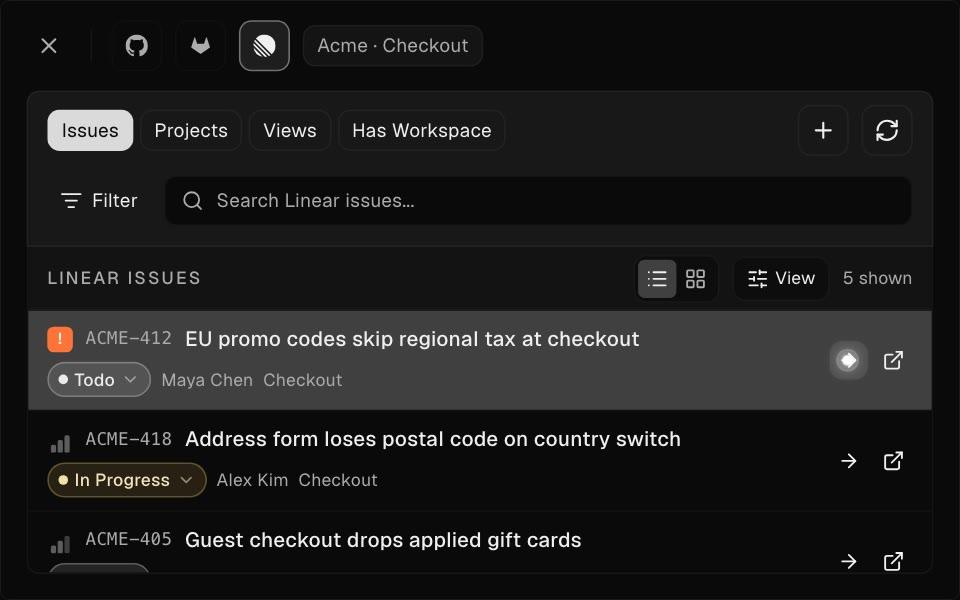 Figure 2: Viewing and filtering Linear and GitHub issues directly inside Orca, with one-click workspace creation and automated bot assignment.
When a customer reports a bug in Linear, a bot can automatically pick up the ticket, create an issue workspace, assign sub-agents to reproduce the failure, and link the resulting pull request back to Linear without any manual data entry.
3. Lead Bot to Multi-Worker Delegation & Model Mixing
Rather than expecting one LLM prompt to solve an entire complex feature, Orca Bots employ hierarchical delegation:
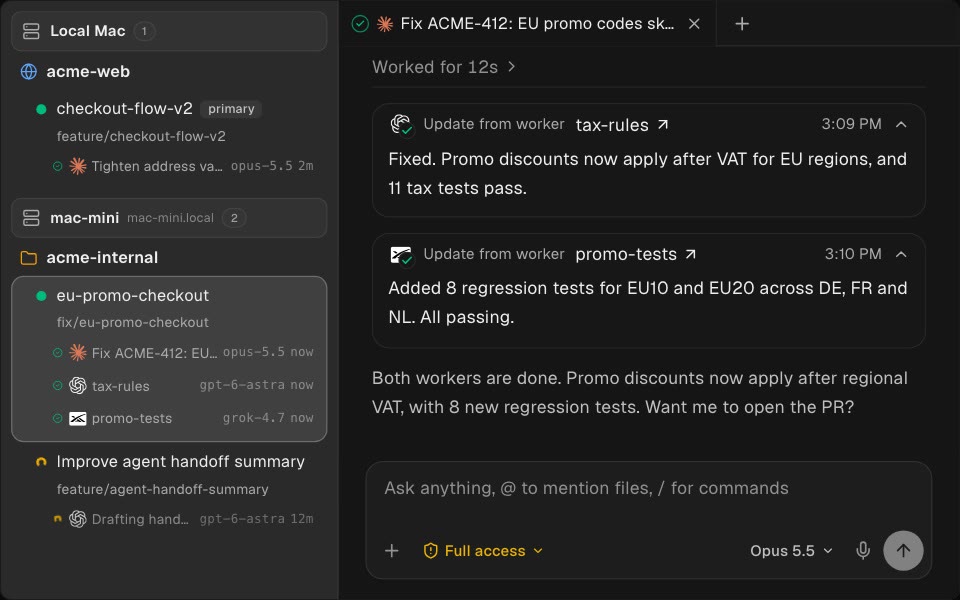 Figure 3: Lead bot coordinating specialized workers across different AI models (Opus 5.5, GPT-6 Astra, and Grok 4.7) on dedicated worktrees.
A coordinator bot can delegate backend tax rules to Claude Code on a local Mac, assign Playwright test suites to Codex on an SSH server (mac-mini), and aggregate results before opening a pull request.
4. Inline AI Diff Annotations & Human-in-the-Loop Review
When reviewing code drafted by an autonomous bot, Orca provides granular feedback mechanisms:
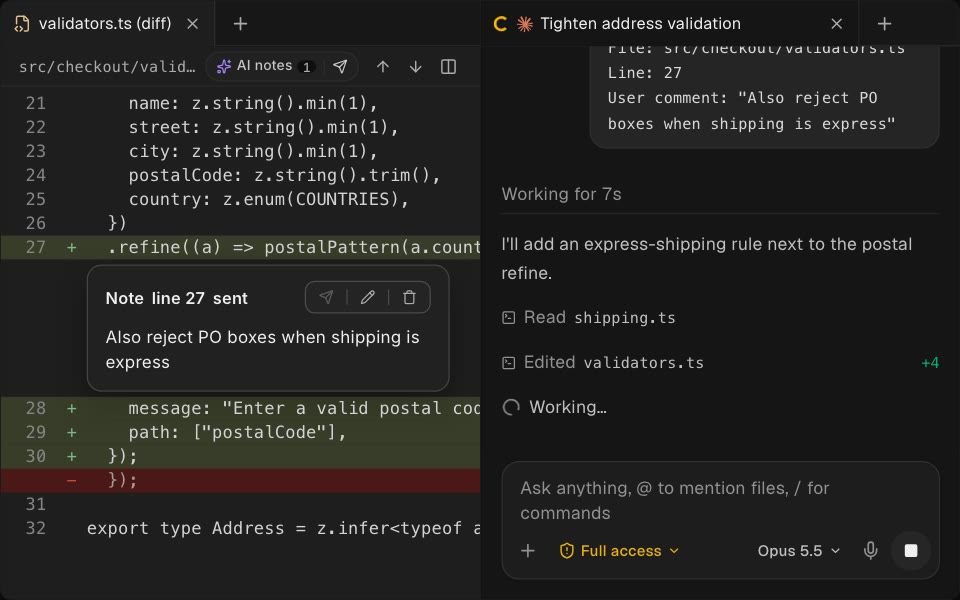 Figure 4: Adding inline notes directly on PR diff lines that are piped back to the bot to refine code before final merge.
You don't need to switch back to chat to explain an issue. Simply click a line in the Monaco diff viewer, add a note ("Also reject PO boxes when shipping is express"), and the bot immediately acknowledges the instruction and amends the commit.
Head-to-Head: Orca Bots vs. Alternative Autonomous Agent Stacks
| Capability | Orca Bots (orca.dev/bots) |
Cognition Devin | GitHub Copilot Workspace | Raw Cron + Bash CLI |
|---|---|---|---|---|
| Execution Architecture | Local / SSH Daemon | Cloud Virtual Machine | Cloud Container | Local Shell |
| Memory Model | SOUL.md & MEMORY.md (Git) |
Opaque Cloud State | Session Context | Ephemeral / None |
| Pricing | 100% Free & Open Source (MIT) | $500/mo enterprise | In Copilot subscription | Free (Pay API tokens) |
| Token Markup | 0% (Direct BYO Subscriptions) | Bundled markup | Bundled in seat | 0% (Direct API) |
| Concurrency | Parallel Git Worktrees | Single sandbox run | Single branch session | Manual tmux / screens |
| Human Gates | Native "Needs You" Cards | Chat interruption | PR review | Terminal prompts |
| Triggers | Linear, GitHub, Slack, Cron | Webhook / Slack | GitHub issues only | Cron / OS daemon |
Field Manual: Deploying Your First Autonomous Triage Bot
Here is our production recipe for setting up Scout, an autonomous bug triage bot that monitors Linear issues and submits tested pull requests:
# Step 1: Create the bot directory inside your repository
mkdir -p .orca/bots/scout

# Step 2: Define the bot constitution in SOUL.md
cat <<'EOF' > .orca/bots/scout/SOUL.md
name: Scout
role: Autonomous Bug Triage & PR Drafter
agent: claude-code
model: anthropic/claude-3-7-sonnet

triggers:
  - cron: "0 9 * * 1-5"           # Run daily bug digest at 9:00 AM weekdays
  - webhook: linear.issue.created # Trigger on newly assigned Linear bugs

rules:
  - Always provision an isolated worktree for bug reproduction
  - Run 'pnpm test:e2e' and 'pnpm typecheck' before drafting a PR
  - If checkout or payment flows are altered, pause at "Needs you" for flag approval
  - Commit messages must follow conventional commits (e.g. fix(checkout): ...)
EOF

# Step 3: Seed initial durable facts in MEMORY.md
cat <<'EOF' > .orca/bots/scout/MEMORY.md
# Scout Memory Journal
- Database: Supabase Postgres with RLS policies enabled.
- Payments: Stripe webhook handlers require idempotency keys in headers.
- Safari gotcha: Pointer events on iOS can drop if sticky cart footer overlaps buttons.
EOF

# Step 4: Launch the Orca headless daemon on your dev machine or server
orca serve --supervise
Once running, Scout monitors incoming events, reports status updates to your Orca desktop or mobile app, and frees you from mundane repetitive triage.
The Verdict
- Stick with standard Orca ADE or Claude Code if: You prefer real-time interactive pairing where you guide every single refactoring decision step-by-step.
- Deploy Orca Bots immediately if: You are a solo builder or small engineering team drowning in Linear bug reports, flaky CI checks, and release notes, and want an autonomous teammate to handle 90% of the mechanical legwork before you sign off on the merge.
Orca Bots proves that the ultimate goal of AI engineering is not faster typing—it is delegating entire workflows to trustworthy, version-controlled autonomous teammates.
Tool Directory Entry: Explore the full specification, pricing breakdown, and pro tips on our Orca Bots Tool Page.