Orca Review: The Open-Source ADE for Running Parallel Claude Code Fleets & Real Feedback from X
The Paradigm Shift: From Single-User IDEs to the "ADE"
In 2024, vibe coding meant typing a prompt into Cursor Composer and watching code stream across your files. In 2025, Anthropic dropped Claude Code, proving that an autonomous agent operating directly in the terminal—reading logs, running test suites, and creating git commits—could outperform inline code completion.
Yet by 2026, every power user hit the exact same structural wall: the single-threaded agent bottleneck.
When Claude Code is busy running an 8-minute end-to-end refactoring or waiting on a slow test suite, your terminal is blocked. If you try to open another terminal tab in the same directory, the second agent stumbles upon unstaged files, clobbers your working tree, or causes catastrophic git branch collisions. Running 5 tmux panes with raw CLIs quickly turns into mental chaos.
Enter Orca (onorca.dev), an open-source (MIT) Agent Development Environment (ADE) created by Stably AI (@orca_build on X).
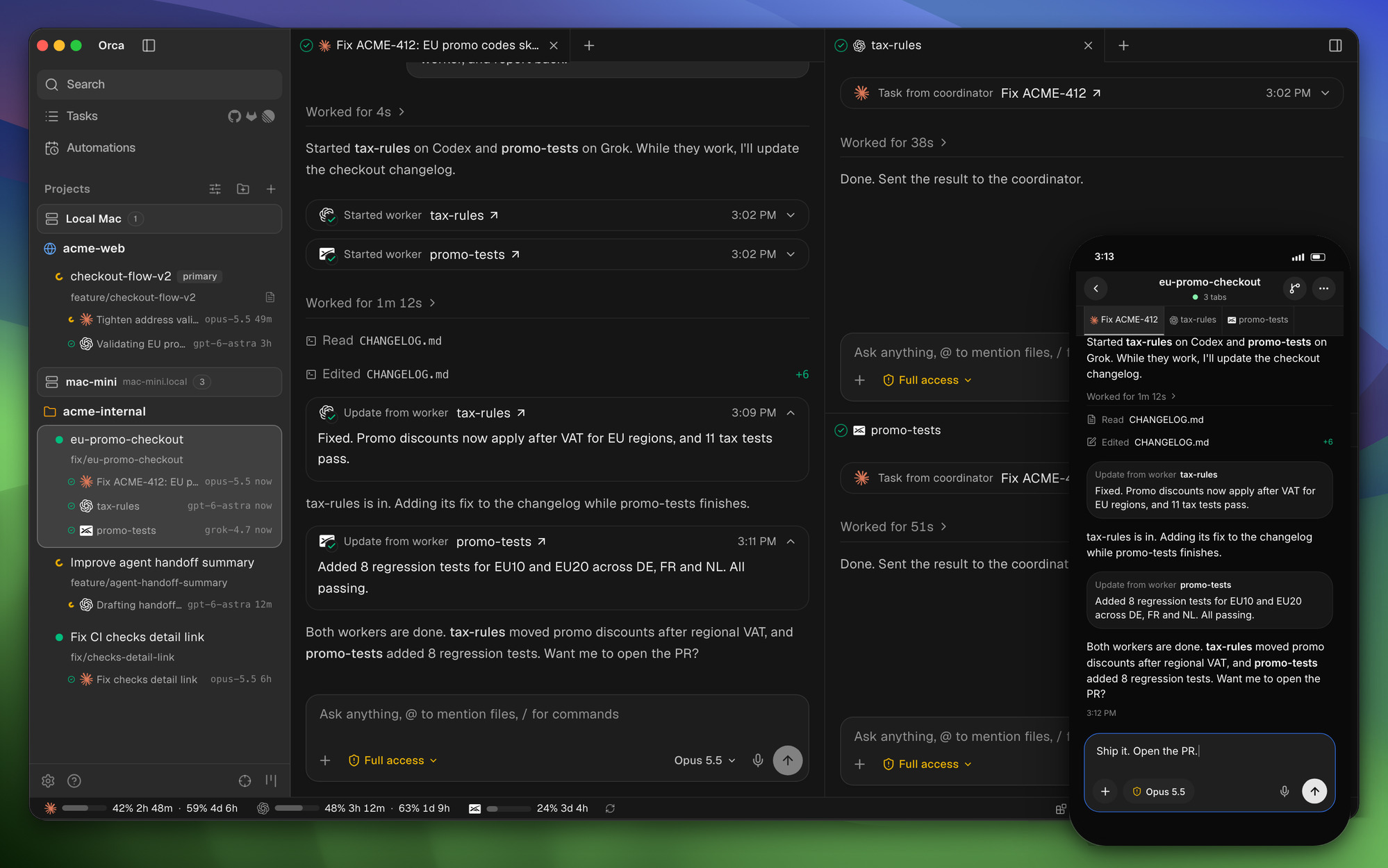 Figure 1: The Orca ADE Mission Control deck running parallel coordinator and worker agents with the iOS mobile companion.
Unlike legacy IDEs built for a single human typing lines of code into a single buffer, an ADE is designed from first principles as an air-traffic control deck for orchestrating fleets of parallel AI coding agents.
Here is how Orca works under the hood, what real developers on X are reporting from the trenches, and whether it belongs in your vibe coding stack.
Real Feedback from X (Twitter) & Developer Communities
Scanning through the timeline of @orca_build and discussions across the vibe coding community reveals a clear divide: developers are blown away by the productivity unlock of parallel agents, but quickly encounter the realities of token consumption and review fatigue.
1. What Builders on X Are Celebrating
"Running 3 Claude Code instances at once used to be a recipe for merge hell and lost unstaged work. Orca isolating each task into an automatic Git worktree feels like moving from single-core CPUs to multithreading. It's the first ADE that actually understands how developers work."
"Design Mode in Orca is pure vibe coding gold. Click the broken modal, prompt 'fix alignment and close on backdrop click', and the agent gets the exact DOM node, computed Tailwind classes, and viewport without you copy-pasting file paths or explaining layouts."
"The paradigm shift is real: we spent 20 years optimizing editors for typing code. In 2026, the IDE is an orchestrator. Stably open-sourcing Orca under MIT with local-first BYO subscriptions is a huge win against $500/mo closed cloud sandboxes."
- 100% Free, Local-First, and Zero Token Markups: Unlike cloud agent startups charging $20 to $500/month seat fees while marking up token margins by 300%, Orca is MIT open-source desktop software. It plugs straight into your existing Anthropic API keys or local CLI credentials.
- Mobile Steering on the Go: Builders who leave long tasks running overnight praised the iOS and Android companion apps. Getting a push notification when an agent requires terminal approval or finishes a test suite—and being able to reply with follow-up guidance from your phone—delivers the feeling of supervising an actual remote dev team.
2. The Honest Criticisms & Real Bottlenecks ("The Catch")
Multiple developers on X warned about the sudden cognitive shift: "You stop writing code and immediately become an exhausted Engineering Manager reviewing 400 lines of diffs from 4 junior engineers all at once." When 4 agents complete features within 20 minutes, human review becomes the primary bottleneck.
- Aggressive Token Burn Multipliers: Running parallel agents burns through API limits rapidly. Having 3 agents running Claude 3.7 Sonnet in the background can deplete hourly rate limits or drain $30–$50 in Anthropic API credits during a single afternoon if run without strict spend caps.
- Local Port and Database Contention: While files are isolated via worktrees, local system resources are shared. If Agent 1 and Agent 2 both run
pnpm devand attempt to bind tolocalhost:3000, or both run migrations on the same local SQLite or Docker Postgres instance, conflicts occur unless custom ports and databases are configured per worktree. - Disk Footprint: Each git worktree creates an additional checkout on your disk. On massive monorepos where
node_modulesspans gigabytes, you must usepnpmwith hardlinks to avoid filling your SSD.
System Architecture: How Orca ADE Orchestrates Parallel Fleets
4 Breakthrough Features That Define the Orca ADE
1. Automatic Worktree Isolation (git worktree)
Instead of switching branches back and forth with git checkout or maintaining dirty stashes, Orca automates git worktrees natively.
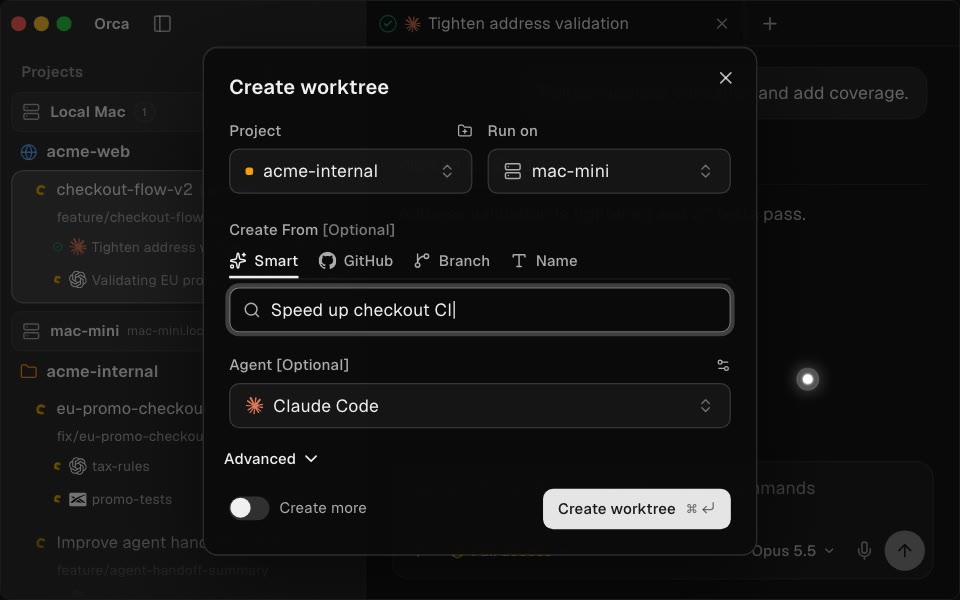 Figure 2: Creating and managing isolated Git worktrees, each running its own autonomous agent session without file collisions.
- You type a prompt: "Refactor Supabase authentication to use PKCE flow".
- Orca branches off
main, creates a linked directory in.orca/worktrees/feat-pkce-auth, and boots your selected agent inside it. - Your primary editor window remains completely unaffected, allowing you to continue building or review other work in parallel.
2. Chat or Terminal Dual Mode
Orca bridges the gap between conversational AI and raw terminal execution:
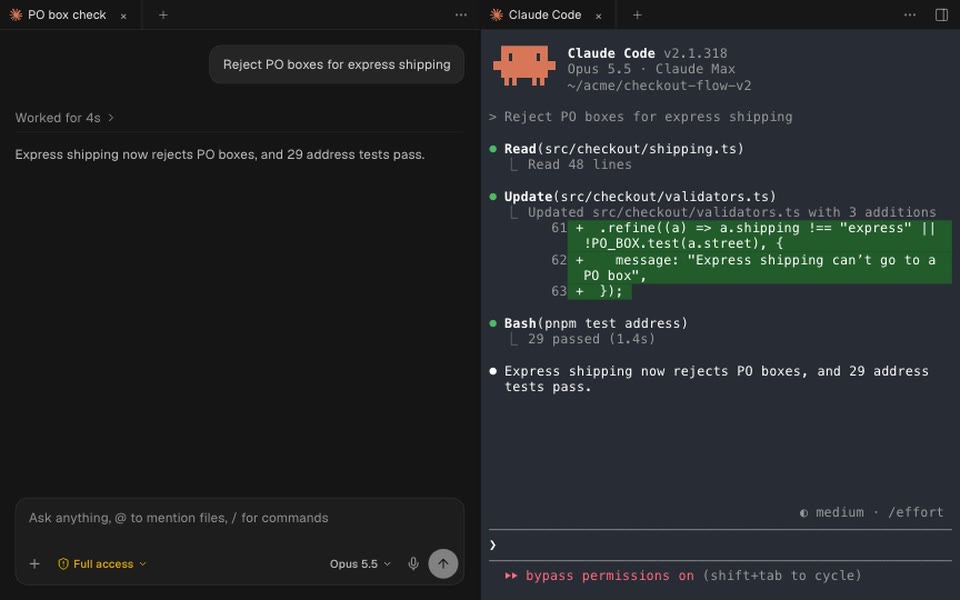 Figure 3: Side-by-side inspection: conversational chat stream on the left, full high-throughput WebGL terminal on the right.
- Prefer a clean, summarized conversation? Switch to Chat View.
- Need to see raw compiler output, ripgrep queries, and shell commands? Toggle into the WebGL Terminal.
- Both views synchronize to the exact same background agent state in real time.
3. Chromium Design Mode: Direct DOM-to-Agent Context
Orca bundles an embedded Chromium preview browser with an interactive element inspector:
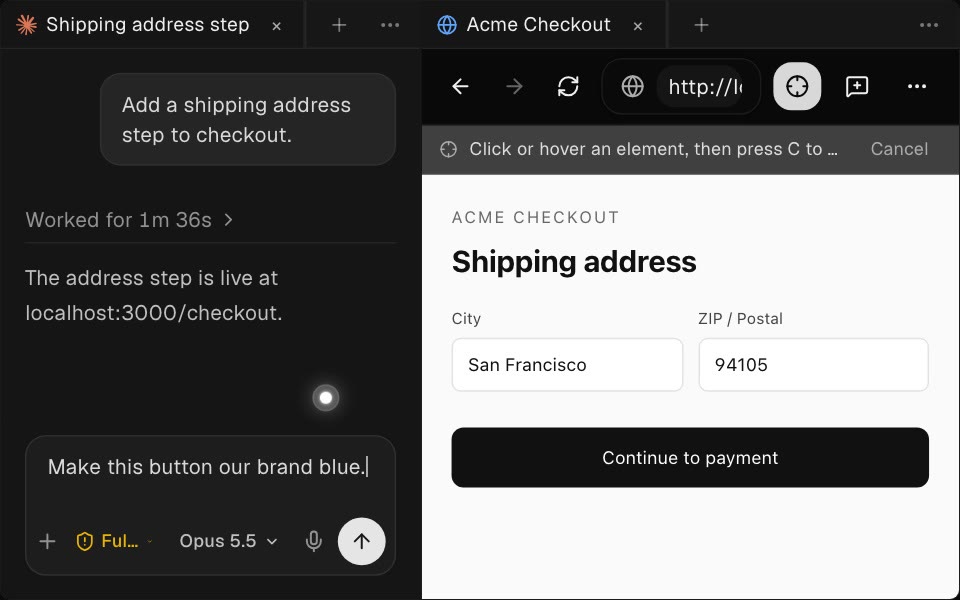 Figure 4: Design Mode lets you click frontend elements in the embedded Chromium preview and pipe DOM hierarchy straight into prompts.
- Hover over any broken UI element or misaligned flexbox in your running web application.
- Click Capture Context.
- Orca extracts the computed CSS, relevant HTML tree, active viewport dimensions, and a visual screenshot, feeding them directly into the agent's prompt buffer. No more guessing which sub-component renders a particular button.
4. Remote SSH Execution & Mobile Companion
Orca supports connecting to remote devboxes via SSH and provides native companion apps:
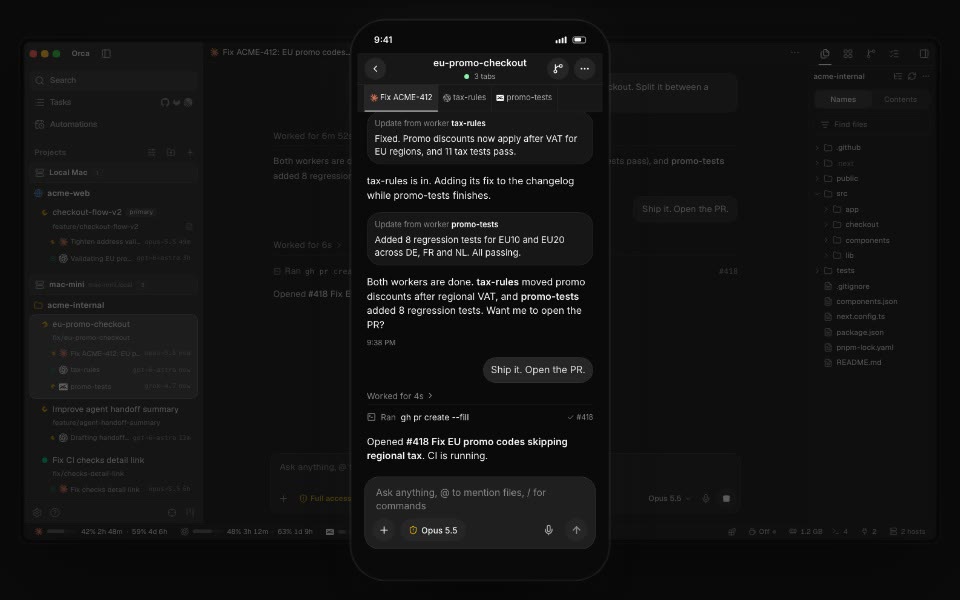 Figure 5: The Orca iOS / Android mobile companion receiving task completion alerts and letting developers steer agents remotely.
- Run your compute-heavy agent fleet on a cheap Hetzner or AWS cloud server while managing the dashboard from a lightweight MacBook Air.
- Pair with the Orca iOS/Android app to get push notifications whenever an agent hits a permission prompt, passes its test suite, or encounters a fatal build error.
Head-to-Head: Orca vs. Cursor vs. Raw Tmux vs. Cloud Sandboxes
| Capability | Orca (onorca.dev) |
Cursor (Composer) | Raw Tmux + Claude Code | Cloud Sandboxes (Devin/Bolt) |
|---|---|---|---|---|
| Primary Architecture | Multi-Agent ADE | Single-Dev IDE | Terminal Multiplexer | Cloud Virtual Machine |
| Concurrency Model | Parallel Git Worktrees | Single buffer/file tree | Manual branch/stashes | Remote cloud container |
| Cost | 100% Free & Open Source (MIT) | $20/mo Pro | Free (Pay API tokens) | $20–$500/mo subscription |
| Token Markup | 0% (Direct BYO API / CLI) | In-plan usage caps | 0% (Direct Anthropic) | Bundled / marked up |
| DOM / Design Mode | Yes (Native Chromium Picker) | Limited to web search | None (CLI only) | WebContainer preview |
| Local Environment | 100% Local Files & Dev Server | Local | Local | Remote sandbox |
| Mobile Steering | Yes (iOS & Android Apps) | No | Via external SSH term | Browser web app |
Field Manual: Orchestrating a 3-Agent Sprint in Orca
Here is our battle-tested workflow for running a multi-agent sprint without merge collisions or runaway token burn:
# Step 1: Install and launch Orca
# Download macOS / Linux / Windows binary from https://www.onorca.dev
# Or clone from GitHub:
git clone https://github.com/stablyai/orca.git

# Step 2: Ensure pnpm is configured for global hardlink sharing
# This prevents 3 worktrees from tripling your node_modules disk usage
pnpm config set store-dir ~/.pnpm-store

# Step 3: Link your repository
orca repo add .

# Step 4: Dispatch 3 parallel tasks across isolated worktrees
# Agent 1: Backend Stripe Idempotency
orca run --agent claude --branch feat/stripe-idempotency \
  "Add idempotency keys to Stripe webhook handlers in src/api/webhooks.ts"

# Agent 2: Frontend Design Fix (using Design Mode selector)
orca run --agent claude --branch fix/hero-mobile-layout \
  "Fix hero banner overlapping navigation on screens under 768px"

# Agent 3: Vitest Coverage Expansion
orca run --agent codex --branch test/auth-coverage \
  "Write unit tests for token refresh and session expiry in src/lib/auth.test.ts"
Reviewing & Merging
- In Orca's main dashboard, each task displays a live status badge:
Thinking,Running Tests,Waiting for Approval, orReady for Review. - Click Compare Diffs to inspect the git diff in Orca’s split-pane Monaco editor.
- If the test suite passes and the diff is clean, click Squash & Merge into Main. Orca automatically deletes the worktree and cleans up the temporary branch.
The Verdict
- Stick with Cursor or raw Claude Code if: You work on quick, sequential tasks where one prompt at a time matches your cognitive rhythm, or your project doesn't have a reliable automated test suite to verify agent output.
- Adopt Orca immediately if: You are a solo builder or technical founder running Claude Code daily, frustrated by terminal locking and branch collisions, and ready to supervise an autonomous multi-agent fleet.
Orca represents the logical next step in software tooling: moving from writing code by hand, to prompting inline, to orchestrating an entire team of background agents from a unified control room.
Tool Directory Entry: Check out the full specifications, pro tips, and pricing breakdown on our Orca Tool Page.